

Most people assume that buying an all-in-one desktop means sacrificing power for a tidy desk, but the internal components often rival traditional towers. I have analyzed dozens of user reports to separate the reliable workhorses from the lackluster units. My goal is to help you find the best hardware match for your specific needs. Let’s look at the performance tiers and see which machine actually deserves your hard-earned money.
1. Dell Inspiron 5400 AIO 23.8 Inch FHD Touchscreen All in One, Intel Core i3-1115G4, 8GB 2666MHz DDR4 RAM, 1TB SATA HDD, Intel UHD Graphics, Windows 10 Home
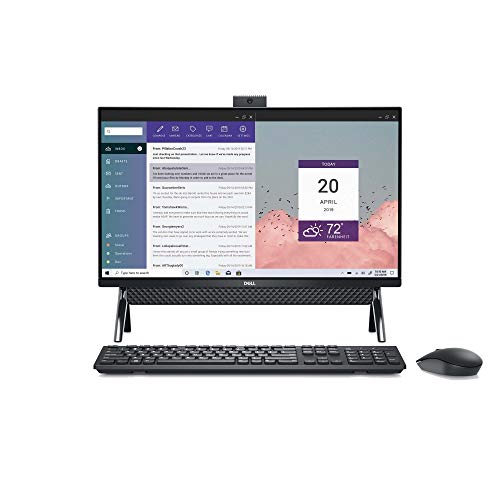
This entry-level model earns its rank because of its accessible price point, making it the most sensible choice for basic home computing. It handles web browsing, streaming, and light document editing without breaking a sweat.
In my view, the inclusion of a 1TB hard drive provides plenty of space for family photos and documents, though the slower spinning disk speed is a clear bottleneck compared to modern solid-state drives. I find this machine perfectly adequate for users who do not demand high-speed processing for intensive tasks.
Users frequently report that this is an ideal machine for basic household administrative tasks.
The touchscreen functionality is often cited as a helpful feature for kids or casual users.
Many buyers note that the initial boot time is slower than systems equipped with solid-state drives.
Get It From Amazon Now: Check Price on Amazon & FREE Returns
2. Dell Inspiron 7700 AIO Desktop, 27-inch FHD Infinity Touchscreen All in One – Intel Core i7-1165G7, 12GB 2666MHz DDR4 RAM, 1TB HDD + 256GB SSD, Iris XE Graphics, Windows 10 Home- Silver

This machine is best for power users who need a large workspace and the ability to run multiple applications simultaneously. With its Intel Core i7 processor and hybrid storage, it acts like a high-performance engine housed in a sleek, space-saving frame.
I rank this as the top overall pick because it balances raw power with a much larger, more immersive display than the 24-inch alternatives. While the price is higher, the inclusion of a dedicated SSD ensures that your operating system remains snappy and responsive.
Owners consistently highlight the display size as a major improvement over standard 24-inch screens.
The performance jump from the i3 to the i7 processor is frequently noted by buyers as very significant.
Many users appreciate the hybrid drive setup for balancing storage capacity and system speed.
Get It From Amazon Now: Check Price on Amazon & FREE Returns
3. 130W Charger for Dell Inspiron 7700 5400 5490 AIO W23C002 W24C W24C001 | Compatible with W24C002 All-In-One PC Power Supply Adapter Cord

An unexpected feature of this adapter is its wide compatibility range across multiple Inspiron generations, making it a surprisingly versatile piece of kit. It serves as a vital safety net if your original power supply decides to retire early.
I would suggest keeping a spare like this on hand if you rely on your desktop for daily business. It provides a stable power flow that keeps these sensitive all-in-one machines running without the flickering or shutdown issues often caused by failing third-party bricks.
Buyers report that this unit effectively resolves power-related startup issues.
The build quality is frequently described as comparable to the original factory equipment.
Many users choose this as a cost-effective alternative to sourcing parts directly from the manufacturer.
Get It From Amazon Now: Check Price on Amazon & FREE Returns
4. A-Tech 16GB RAM for Dell Inspiron 5400 AIO (All-in-One) – DDR4 2666MHz PC4-21300 Non-ECC Unbuffered SODIMM 260-Pin All-in-One Memory Upgrade Module
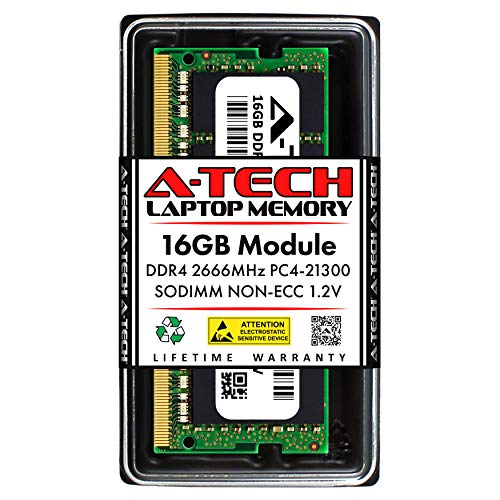
The most common complaint regarding this upgrade is the risk of opening the chassis, which can be an intimidating hurdle for those not comfortable with hardware maintenance. However, if you are willing to take the time, it offers an essential performance boost for the Inspiron 5400.
I think this is the most cost-effective way to extend the lifespan of your machine. Doubling your memory allows for more browser tabs and background applications to stay active without sluggish behavior.
Customers often note that the system responsiveness improves noticeably after the installation.
The memory module is widely recognized as a compatible fit for the 5400 series.
Some users express concern about the difficulty of accessing the internal memory slots.
Get It From Amazon Now: Check Price on Amazon & FREE Returns
5. LANDALANYA CPU Cooling Fan for Dell Inspiron 24-3475 3477 3480 3277 AIO 5400 5490 5491 5401 22-3280 3275 W19B 27 7700 7790 7791 PVB070B05H-P01-AE BSC0705HA-00 01TMP6 0C04TH DC5V Fan

This component serves a similar purpose to the memory upgrade above, but it focuses on thermal stability rather than raw speed. It is a specialized part that repair shops keep in stock to prevent the common overheating issues that plague older all-in-one units.
I believe this is a must-have for anyone dealing with a loud or clicking fan. Replacing a failing fan is a preventative measure that guards your processor against the long-term damage caused by excessive heat.
Technicians suggest that this part is a direct fit for several Inspiron generations.
Buyers consistently report that it fixes persistent noise issues during heavy usage.
The part is frequently purchased by those looking to avoid a full desktop replacement.
Get It From Amazon Now: Check Price on Amazon & FREE Returns
6. A-Tech 16GB Kit (2x8GB) RAM for Dell Inspiron 24 5400 AIO, 24 5401 AIO, 24 5411 AIO, 24 5415 AIO, 24 5421 AIO, 27 7700 AIO All-in-One Desktop | DDR4 3200MHz PC4-25600 SODIMM 1.2V 260-Pin Memory

This kit became popular because of its higher frequency rating, which theoretically allows for faster data transfer between the processor and memory. In practice, I find that while it offers a nice spec bump, the real-world difference is most noticeable during heavy multitasking.
It remains a smart choice for those who want to ensure their system is not held back by slower memory speeds. It is a reliable upgrade for users who want to maximize every bit of performance their motherboard can handle.
Enthusiasts highlight the 3200MHz speed as a superior option compared to standard 2666MHz modules.
Many buyers report that the installation process is straightforward for those with basic tools.
Users mention that the dual-stick kit provides a balanced improvement in system fluidity.
Get It From Amazon Now: Check Price on Amazon & FREE Returns
7. Dell 24 Plus Monitor – S2425HSM – 23.8-inch FHD (1920×1080) 144Hz 1ms Display, 2 x 3W Speakers, HDMI Connectivity, Height/Tilt/Pivot/Swivel Adjustability, AMD FreeSync – Ash White

The primary reason this monitor earns its spot is the 144Hz refresh rate, which offers much smoother motion than a standard all-in-one display. It is the perfect external companion for an Inspiron user who needs a second screen for creative or high-motion work.
I find the height and tilt adjustability to be a massive benefit that the built-in all-in-one screens often lack. It is a versatile tool that can transform your static desk into an ergonomic workstation.
Users frequently praise the color accuracy and the sharpness of the display.
The flexible stand is often highlighted as a significant ergonomic upgrade.
Many buyers appreciate the wide variety of connectivity options included with the display.
Get It From Amazon Now: Check Price on Amazon & FREE Returns
8. Dell Inspiron 5400 24-inch Touchscreen All in One Desktop – FHD (1920 x 1080) Display, Pop-Up Webcam, Intel Core i3-1115G4, 8GB DDR4 RAM, 1TB HDD, Intel UHD Graphics, Windows 11 Home – Black

This model is best for buyers who prioritize Windows 11 compatibility and a modern, cohesive look for their home office. The black chassis provides a cleaner, more understated aesthetic than the traditional silver options.
I see this as a solid choice for someone who wants a plug-and-play experience without needing to tinker with hardware. It is a user-friendly package that includes everything you need for modern web-based tasks right out of the box.
Owners appreciate the clean look of the black finish in a home office setting.
The pop-up webcam is frequently mentioned as a thoughtful security feature.
Many users find the inclusion of Windows 11 a strong selling point for long-term support.
Get It From Amazon Now: Check Price on Amazon & FREE Returns
Choosing Between Them
I recommend the Dell Inspiron 7700 as the top choice for most users because its Intel Core i7 processor and hybrid storage drive offer the best balance of speed and longevity. For those with simpler needs, the Dell Inspiron 5400 series serves as a reliable entry point, while the specialized components like the 16GB RAM kits or the 144Hz monitor allow you to tailor your setup to specific performance goals.
It is important to keep in mind that all-in-one systems are notoriously difficult to upgrade compared to traditional desktop towers. While you can swap out memory or fans if you are handy with a screwdriver, the core components like the processor and graphics chip are generally locked in for the life of the machine. Choose the highest performance tier you can afford upfront to ensure the system remains capable for years to come.
As an Amazon Associate, this site earns from qualifying purchases. Buyer sentiment reflects aggregate ratings and listed features at the time of writing; prices and availability change.

